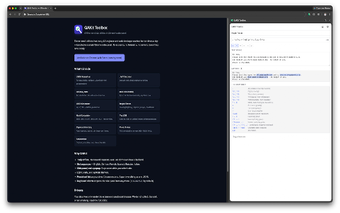
QAKit Toolbox: a local-side-panel toolkit for QA and developers
QAKit Toolbox from QAKit is a Chrome Side Panel extension that bundles offline utilities for QA engineers and web developers to speed routine diagnostics. It places multiple small tools in a single panel, runs entirely locally, and keeps settings and history stored persistently on the device. The extension targets testers and developers who need private, quick access to in-browser helpers without switching to separate sites or apps. It supports multiple languages and offers a screenshot annotator and clipboard recorder.
Which diagnostics the toolbox handles without outside sites
The toolbox collects common QA utilities into a single panel, providing tools you would otherwise reach for on separate pages. Included utilities cover JSON formatting with JSONPath autocomplete, a JWT decoder that splits and inspects expiry and payload, a regex tester with live match highlighting and a cheatsheet, batch UUID generation for v4, v7 and NIL, and a hash calculator for MD5, SHA-1, SHA-256 and SHA-512. Text diff supports side-by-side and unified views with ignore options.
How the toolbox treats private debugging data
Privacy and local control drive the design, the developer states there is no analytics, no telemetry, and no data collection of any kind. Tools run inside the browser sandbox so sensitive strings and tokens do not leave the device. History and user settings are saved locally and survive browser restarts, which preserves recent queries but keeps them on your machine rather than syncing to external services.
How it fits into Chromium-based workflows and quick checks
The toolbox integrates with Chromium workflows and installs as a Chrome extension that also runs on other Chromium-based browsers such as Microsoft Edge, Brave, and Vivaldi, subject to Side Panel support. It offers a customizable keyboard shortcut to open the panel, a searchable clipboard history with pinning, and UI themes. The collection concentrates routine tasks used during debugging, reducing context switches to separate web tools or extensions.
A practical, privacy-first utility pack with a collaboration trade-off
QAKit follows an open-source ethos and requires no accounts, which suits engineers who must keep diagnostics local and auditable. The design sacrifices account-linked sync or cloud sharing, so teams must use external channels to exchange saved queries or annotated screenshots. For individuals and small teams that need private, in-browser tools, the toolbox is a practical, privacy-centered choice with that explicit trade-off.